
How to set up IP whitelist
If you want to allow only specified IP addresses to make API calls, you can enable it. IP whitelist Function.
Precautions
Before turning on the IP whitelist, please create an API first. For details, please see How to create an API 。
Operating steps
①Click “Security Center” , in “API” The page can view existing APIs.
Figure 1
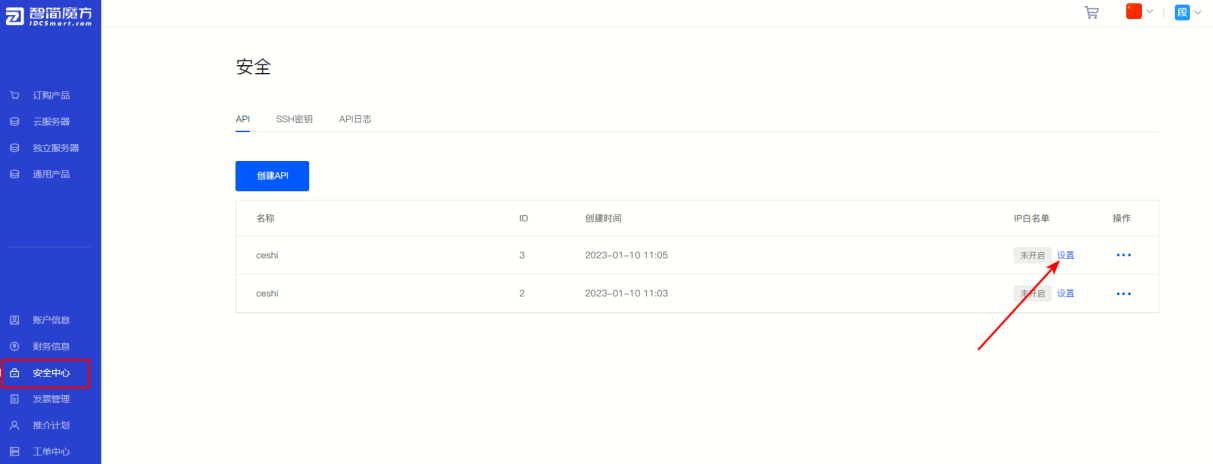
②As shown in the figure above (Figure 1), select the corresponding API interface and click “IP whitelist” Click on a column “Settings” 。
③If the IP whitelist function is not enabled for this interface, please first “On” , then fill in the IP address allowed to access, click "Submit" That’s it.
Figure 2
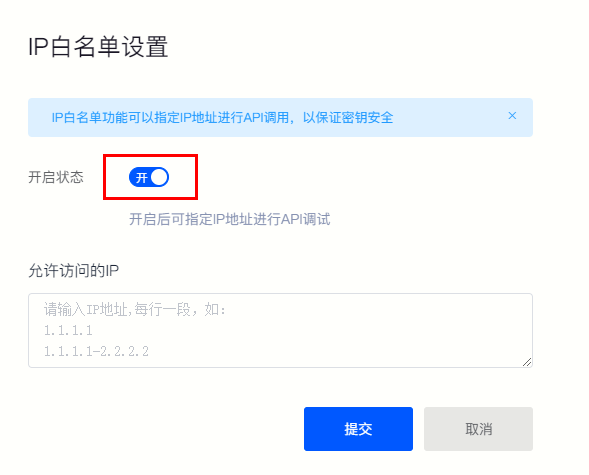
④After successful setting, only IP addresses in the whitelist will be allowed for API debugging.
Back to List
